Anthropic Turns Claude Artifacts into Standalone Desktop Apps
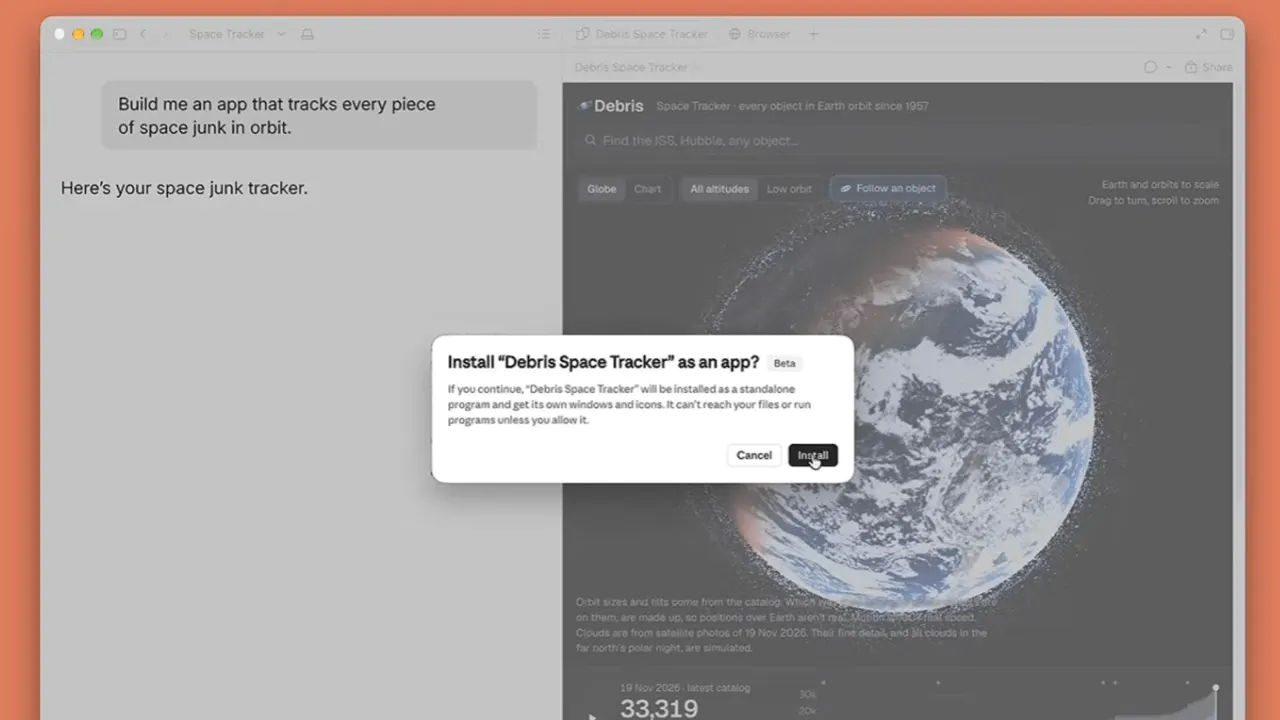
Anthropic rolls out Install as app in beta, letting users turn interactive Claude Artifacts into standalone Mac and Windows desktop apps with live syncing and tiered OS permissions.
One of the lingering friction points of AI-generated interactive tools has been where they live: trapped inside a chat thread or buried among dozens of browser tabs. With a new beta feature called Install as app, Anthropic is removing that boundary. Users can now convert interactive Claude Artifacts into standalone desktop applications for macOS and Windows—complete with their own dedicated windows and desktop icons—without touching build pipelines or software packaging tools.
The release signals a clear shift from AI chatbots as conversational helpers toward personal software studios. With a single prompt, anyone can ask Claude to build a custom Pomodoro timer, a local file organizer, a focused task tracker, or a menu bar utility, and immediately spin it out into native-feeling desktop software.
How Does the Install as App Feature Work?
The workflow runs directly inside Claude Desktop. Once Claude generates an interactive tool or utility as an Artifact, users open the artifact's share menu and choose Install as app. Instead of remaining tethered to the conversation pane, the tool launches in its own independent window and registers a dedicated application icon on the desktop.
Anthropic draws a clear line around what qualifies for installation: only interactive tool and application artifacts can be installed. Standard document-style outputs such as Claude Docs, Slides, and Sheets are excluded. Installed apps also require an active internet connection and an active sign-in session in Claude Desktop to launch and operate.
Three-Tier Security and Permission Model
Giving AI-generated utilities direct access to a host operating system introduces obvious security considerations. To balance capability with user control, Anthropic structured the feature around three explicit permission tiers:
- Default: Keeps the installed app strictly within standard browser and sandbox boundaries with no elevated operating system access.
- App Permissions: Allows the app to request common desktop conveniences such as system notifications, always-on-top window behavior, and global keyboard shortcuts.
- Full Computer Access: Lets the app request permission to run local programs or read, modify, and delete files on the machine.
During installation, users inspect and approve the exact permissions each app requests. Anthropic advises exercising caution and reviewing requests thoroughly before granting full computer access, especially for shared artifacts created by others.
Anthropic Announces a New Analytics System to Measure the Return (ROI) on Claude Code Spending

Claude Can Now Join Google Meet Calls Like Any Other Team Member with Claude Meetings
Live Syncing, Connectors, and Team Sharing
Installed artifact apps are not frozen snapshots. Each desktop app stays dynamically connected to its underlying artifact in Claude. Whenever you—or a teammate—edit or improve the artifact inside Claude, the standalone desktop app updates automatically without requiring a manual reinstall.
Each installed app can also tap into your existing Claude subscription and active connectors, such as calendar or email workflows, with any model calls made by the app counting against your standard plan usage limits. Because artifact apps can be shared with others, small teams can distribute lightweight internal utilities in seconds rather than maintaining full internal deployment pipelines.
System Requirements and Plan Availability
Using Install as app requires Claude for Mac or Windows version 6.28899.0 or newer. Mac users can update via Claude > Check for Updates, while Windows users can check via the main menu under Help > Check for Updates.
The beta is rolling out across Free, Pro, Team, and Enterprise plans, though HIPAA-ready organizations and certain hybrid configurations are excluded for now. Organizational defaults are carefully scoped: Team plans have the feature enabled by default while requiring admin opt-in for full computer access, whereas Enterprise plans keep the feature disabled until an organization owner explicitly enables it in admin settings.
A New Era for Personal Software Creation
Turning Claude Artifacts into standalone desktop applications pushes the cost of bespoke micro-software close to zero. Narrow workflow utilities that once required hiring a developer or subscribing to yet another SaaS tool can now be prompted, installed, and iterated on in minutes. By moving AI-generated software out of the browser tab and directly onto the desktop, Anthropic is showing what everyday computing looks like when software becomes truly on-demand.
This week’s posts, in your inbox every Monday
A short summary of the posts published that week on AI, Claude Code, MCP and web development. No new posts, no email.
- One email a week
- No ads
- One-click unsubscribe