Perplexity Launches Personal Computer for Mac: The Era of AI Agents Running on Your Computer
Originally published in Turkish. Read the original →
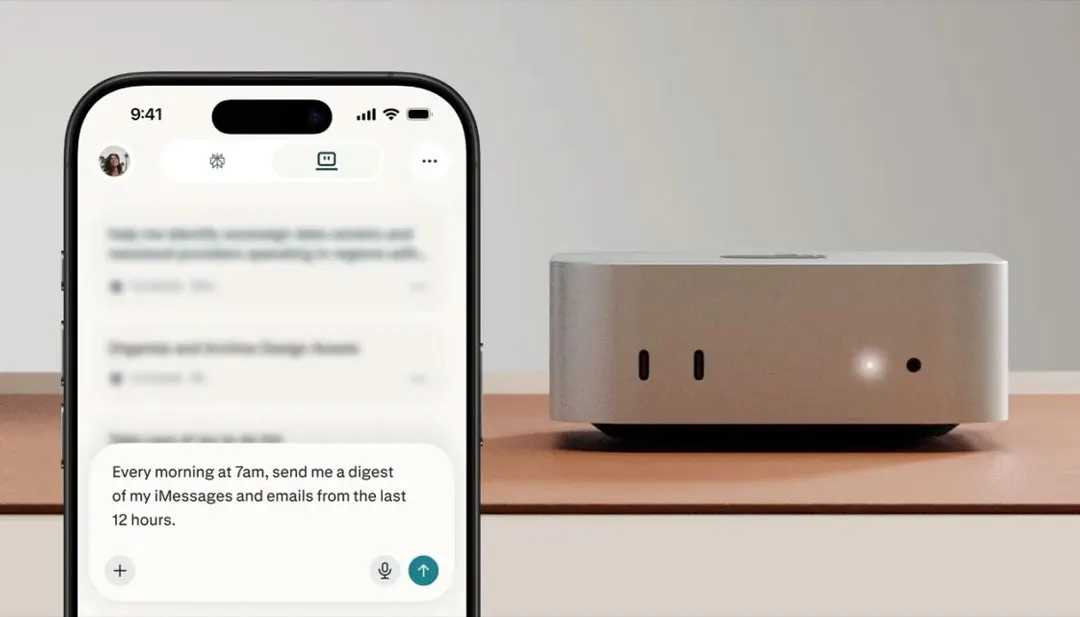
Perplexity Personal Computer for Mac shows that AI can be not just a tool that searches in the browser but an agent that manages workflows on the user's computer. We look at what this new Mac-focused experience promises.
With its Personal Computer for Mac move, Perplexity is taking the idea of an AI assistant beyond the browser window. The new product aims to turn the Perplexity Computer experience into an agent layer on the Mac that can work across local files, apps and the web. This matters because it moves AI from being a tool that answers questions or searches the internet to becoming a direct part of how we use computers.
Perplexity has long stood out with its search- and research-focused AI experience. Giving users sourced answers, gathering information on the web and summarizing complex topics are among the company's main strengths. Personal Computer for Mac takes this capability further: not just researching on the web, but carrying out tasks in the user's own work environment.
This approach represents an increasingly visible trend in AI products. Users no longer want to ask the model questions in a separate box; they expect the model to find files, work across apps, organize to-do lists, compare documents and take an active role in their daily workflow. Perplexity's Mac move responds directly to that expectation.
What Is Personal Computer for Mac?
Personal Computer for Mac can be thought of as an experience that brings Perplexity's AI agent closer to Mac computers. The system aims to help users complete tasks by connecting their local files, Mac apps and web sources. This is different from the classic chatbot experience, because the agent doesn't just write answers; it also takes the tools in the work environment into account.
For example, when the user says "pull the customer requests out of last week's meeting notes, compare them with the related files and prepare a priority list for me", the agent can work across local documents, notes and web information. Or it can step in for more operational tasks like "tidy up my Downloads folder, separate the invoices and move the images into the project folder".
Scenarios like these still require careful user approval today. An AI agent accessing local files, making edits or carrying out actions across apps is a sensitive matter. For Perplexity to succeed in this area, it needs to offer not only a powerful model but also a secure permission system and a design where actions can be undone.
Why Does Starting with the Mac Make Sense?
Perplexity launching the Personal Computer experience on the Mac is understandable strategically. Developers, designers, content creators, founders, researchers and professionals doing intensive knowledge work make up a large share of Mac users. These user groups are more inclined to adopt AI tools early.
The Mac ecosystem also offers a more controlled hardware and operating system environment. A more predictable experience can be built on top of AppleScript, Shortcuts, file system permissions, security frameworks and native app behavior. This gives agent-based products an advantage at the start.
The emphasis on the Mac mini is also notable. The idea of a device that stays on all the time, runs quietly on the desk and can manage daily workflows in the background fits well with the future of AI agents. A computer can do organizing, research or preparation not only when the user is sitting in front of it, but also in the background. Of course, in that kind of use, permission boundaries need to be very clear.
Perplexity's Difference: A Research-Focused Agent
Perplexity's strongest side is its research experience. While ChatGPT and Claude stand out as more general-purpose assistants, Perplexity has long differentiated itself on sourced answers, web browsing and verifying information. Personal Computer for Mac can bring this research muscle to the local work environment.
For a researcher, this could be very valuable. Local PDFs, articles, notes and web sources can be evaluated within the same task. A product manager can have a decision document prepared by combining user interviews, competitive analyses and market news. A developer can connect documentation, error logs and local code notes.
The real difference here is that the AI can say "I evaluated the context on your computer together with information from the internet" instead of "I found this on the internet". Correctly combining personal and corporate data with open web information will be one of the core skills of future AI assistants.
Security and User Control
The most critical issue with AI agents running on a computer is security. An assistant that searches the web making a mistake is not the same as an agent that edits local files making a mistake. Moving the wrong file, sending confidential information to the wrong place, sending something automatically or sensitive data entering the model's context can create serious risks.
That's why, in products like Personal Computer for Mac, the permission system must be at the center of the product. Users should clearly see which folders it has been given access to, in which apps it can take actions and which steps require approval. AI actions should be logged, be reversible and remain open to user intervention.
It's important in this respect that topics such as sandboxing, auditable actions and user control stand out in Perplexity's announcements. But real trust forms in daily use. As users try the agent a few times on small tasks and see that it doesn't make mistakes, they start granting it more permissions. Trust must be built gradually.
AI Agents Changing the Computer Experience
Personal Computer for Mac is part of a bigger change: computer interfaces are being reshaped by AI agents. Today, users constantly switch between the file system, app menus, browser tabs and search boxes. The agent-based experience tries to bring these pieces together around the user's goal.
In this approach, instead of thinking "which app should I open?", the user writes or says "what do I want to do?" The agent picks the necessary apps, gathers the information, presents options and acts upon approval. This shifts computer use from memorizing commands toward expressing intent.
Of course, this transformation won't happen overnight. Professional users don't easily give up control. File organization, project structure, confidential information and work habits are personal territory. That's why successful AI agents get adopted through a controlled-assistance approach rather than aggressive automation. Perplexity will also need to keep this balance.
Perplexity's Position in the Competition
With this move, Perplexity makes a more concrete entry into the agent space that ChatGPT, Claude, Gemini and Grok are also targeting. While OpenAI advances on apps and computer use, Anthropic is strengthening Claude with tool connections and coding workflows. Google is combining Gemini with Workspace and research agents. xAI looks ambitious on the Grok Computer side.
Perplexity's advantage is research trust and the habit of sourced answers. Its disadvantage is a smaller ecosystem than its rivals. Considering Google's Workspace, Microsoft's Office, OpenAI's large user base and Apple's control of the operating system, Perplexity needs to show users real value. That's why Personal Computer for Mac is an important test.
If the product saves users time in their daily workflow, runs securely and combines research quality with local context, it could create strong differentiation for Perplexity. Otherwise, it risks remaining just an interesting demo. In AI agents, success shows up in reliable repeated use rather than an impressive launch.
Personal Computer for Mac is a strong sign that AI could change the way we use computers. Perplexity's chances in this area will depend on whether it can correctly combine its research-focused identity with the local computer experience.




