Manus My Computer: The App That Turns Your Mac into an AI Agent
Originally published in Turkish. Read the original →
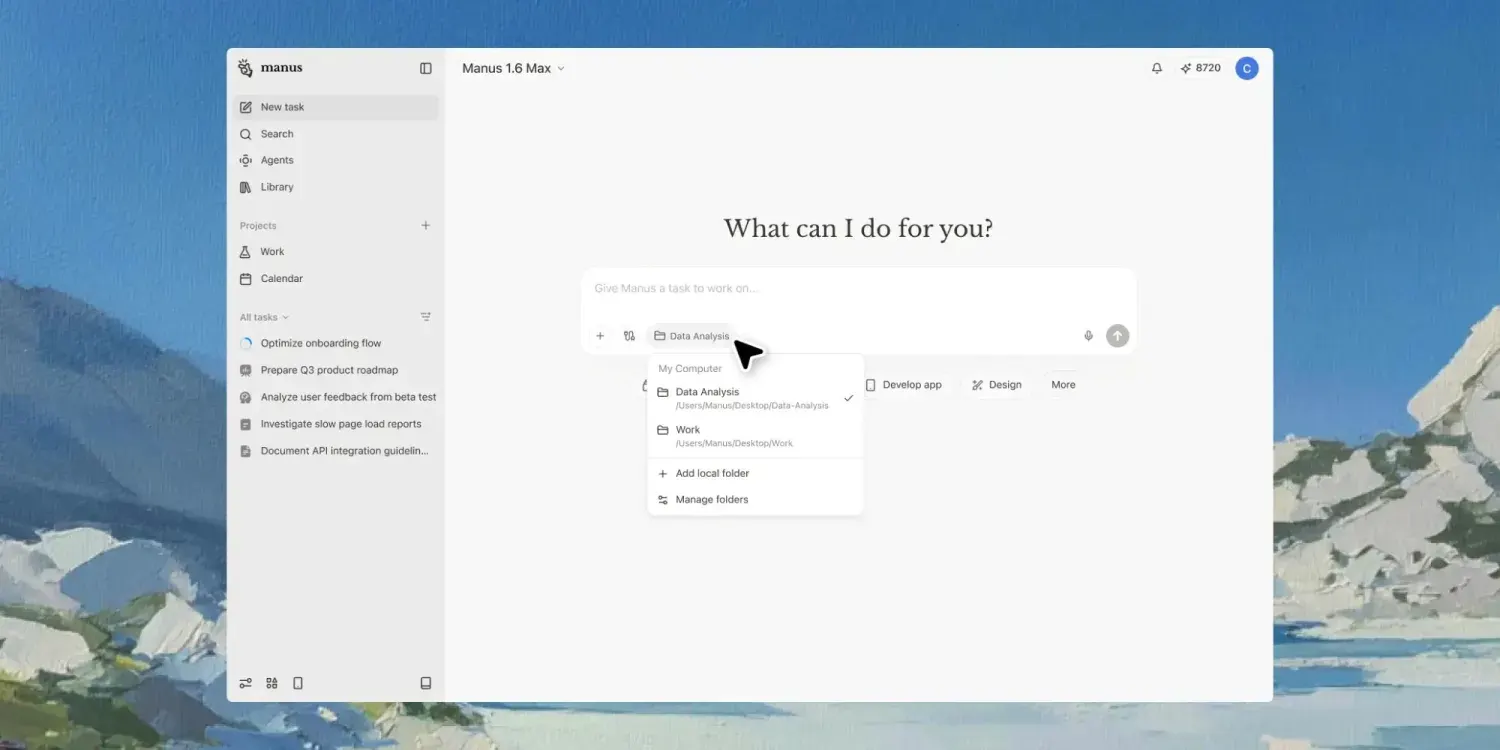
Manus, now part of Meta, has launched a new 'My Computer' app that turns MacBooks directly into an AI agent. This local system, which accesses files, opens apps, runs terminal commands and builds software, is poised to fundamentally change the way we use computers.
When you think of AI tools, a chat window probably comes to mind. You ask a question, and the AI answers. Maybe it writes code, maybe it generates some text. But in the end, the interaction always stays within the same frame: you give a command, and it presents an output inside a text box. Manus's new app, "My Computer," was designed to break this frame. AI no longer just answers you; it uses your computer on your behalf.
Announced in March 2026 by Manus, which was acquired by Meta, this app aims to turn MacBooks into a full-fledged AI agent. It is not a cloud-based service but a local system that runs directly on the device. And the capabilities it offers are clearly different from the desktop AI assistants we have seen so far.
From a Chat Window to System Control
Traditional AI assistants run inside a sandbox. When you tell ChatGPT to "organize the files on my desktop," it gives you steps explaining how to do it. Maybe it writes a Python script. But it doesn't run that script, doesn't access your files and doesn't see your desktop.
Manus My Computer removes this limit. The app can access the macOS file system directly. It can analyze the scattered files on your desktop and sort them into folders by type. It can rename documents. It can organize your Downloads folder by date or file type. While doing this it asks for your approval, but it physically performs the operation itself.
At the core of this approach is a paradigm called "computer use." Popularized by Anthropic with its Claude model, this concept is a working model in which the AI can see the screen and simulate mouse and keyboard interactions. Manus takes this a step further by combining it with system-level API access. In other words, the AI doesn't just read the pixels on the screen; it can communicate directly with the file system and the application layer.
Terminal Access: Power and Risk Together
Perhaps the most striking feature of My Computer is its ability to run terminal commands. The user gives an instruction in natural language, and the AI translates it into the appropriate terminal commands and runs them.
In practical scenarios this is an extremely powerful capability. For example, when you say "convert all the PNG files in this folder to WebP," the system can perform a batch conversion in the background using ImageMagick or a similar tool. Or with the instruction "clean up unnecessary brew packages on the system," it can remove unused dependencies through Homebrew.
For developers, the potential is even wider. Routine operations such as cloning a Git repo, installing dependencies and starting a dev server can be triggered with a single natural language command. In the demos Manus shared, the user gives high-level instructions such as "turn this idea into a working app," and the system creates the project structure, writes the code, installs the dependencies and makes the app runnable.
Of course, terminal access is also the most sensitive security point. A misinterpreted command can damage system files or lead to unwanted data loss. How Manus manages this risk will be decisive for the app's long-term adoption.
App Control: AI in the Operator Role
Beyond file management and terminal access, My Computer can open and control macOS apps. When you need to prepare a presentation, it can open Keynote and create the slides. When you need to edit a spreadsheet, it can launch Numbers and fill in the cells. It can do research in Safari and transfer the information it finds into a document.
This feature moves AI from the "advisor" role to the "operator" role. The difference is big: an advisor tells you what you should do, an operator does the job for you. This shift could be revolutionary, especially for users with limited technical knowledge. Someone who doesn't know how to write terminal commands can now reach the same results with natural language.
One of the notable scenarios in Manus's demos is multi-app coordination. For example, you can give chained tasks spanning several apps and operations, such as "put the photos on the desktop into folders by date, create a summary document for each folder and zip the whole structure." The system breaks this instruction down into subtasks and executes them in order.
The Local Working Model: Why It Matters
My Computer being local rather than cloud-based is a deliberate design decision. Your files are not uploaded to servers; operations take place on the device. This approach has a few critical advantages.
The first is privacy. Data such as sensitive documents, financial spreadsheets and personal photos never leaves your device. In corporate environments, this feature significantly reduces concerns about data leaks.
The second is speed. With cloud-based AI services, every request travels to the server and back. While this delay may go unnoticed in simple queries, it can cause lag in intensive tasks such as file processing. In the local working model, this delay disappears.
The third is offline use. Core functions being able to work without an internet connection is an advantage, especially when traveling or in environments with limited connectivity.
But local operation has its downsides too. The MacBook's processing power and memory limit the size of the model that can run. There is no access to the massive computing resources that cloud-based systems offer. For this reason, it is not yet clear whether My Computer will move to a cloud-assisted hybrid model for some advanced tasks.
Software Development: From Idea to App
Manus's most ambitious demo is AI developing an app from scratch. The user describes an idea, says "a simple desktop app that does real-time translation," and the system creates the project scaffold, installs the necessary libraries, writes the code and produces a runnable app.
This scenario is on a different level from current AI coding assistants. Tools like Cursor, Claude Code or GitHub Copilot help in the code-writing process, but they all work in the context of an IDE. My Computer, on the other hand, can open the IDE itself and create a project, run commands in the terminal and manage the file system. In other words, instead of being stuck inside a single tool, it can conduct the whole system like an orchestra.
Of course, these demos were done in controlled environments. How much of a complex software project it can successfully build in the real world, and how it will behave with error handling and edge cases, will become clear over time.
Security Questions and Industry Implications
An AI having such broad authority over your computer inevitably raises security questions. Capabilities such as deleting files, running terminal commands and controlling apps can have serious consequences in the wrong hands or when they malfunction.
Manus is expected to offer a multi-layered approval mechanism for this. Measures such as user approval before critical operations, automatic backups for reversible actions and access restrictions on certain directories or apps could be part of this mechanism. But the practical effectiveness of these security layers will be tested as the app spreads.
Meta acquiring Manus also adds another dimension to this development. One of the world's largest data companies offering an AI system that can access users' local files and apps will take the privacy debate to a different level. While the emphasis on "local operation" is aimed at easing these concerns, given Meta's history with data practices, building user trust will not be easy.
Our Relationship with Computers Is Changing
From a broader perspective, systems like Manus My Computer are a sign that the way we interact with computers is undergoing a fundamental transformation. Graphical interfaces, the mouse and the keyboard have formed the basis of computer use for decades. Touchscreens expanded this paradigm but did not fundamentally change it.
AI agents, however, offer a different layer of interaction. Instead of thinking "which option in which menu should I click," the user can now express their intent in natural language. The intermediary interprets this intent and takes the necessary steps itself. This means the interface is abstracted away; the user communicates not with the operating system but with the AI.
Considering that Apple Intelligence, Apple's own AI strategy, does not yet offer this level of system control, Manus's move shows that third-party developers can get ahead of Apple in this area. How Apple will respond, and whether it will offer similar capabilities built into future versions of macOS, will be a development the industry follows closely.
In short, Manus My Computer heralds a new era in which AI stops being an "assistant" and becomes a "user." Although this transformation appears limited to the Mac ecosystem for now, if it succeeds, its spread to Windows and Linux platforms is inevitable. The decades-old way we relate to our computers could be radically redefined in the next few years.




